Blog
Choices and software
In 1996 the Ariane 5 exploded 37 seconds after launch, one the most expensive mistakes in software history. The reason was a poor software decision.
The team reused the software from Ariane 4 to save time. The problem, simplifying, was that the new rocket produced a much larger horizontal velocity than the previous one, so a variable in the software quickly exceeded its maximum value, leading to a series of software failures that ended in the destruction of the rocket and the loss of $370 million.
Poor choices can lead to a lot of pain and regret, but they don't only come from picking wrong — they also come from not revisiting what you picked. I've heard many times "you learn from your mistakes" or that "mistakes make you stronger". I don't disagree, but many poor decisions can be avoided when thinking carefully and being informed. It sounds obvious, but especially in software the importance of choices is often underestimated.
Ok, sometimes it's impossible to know in advance your best options — nobody has a crystal ball that tells them a library will be abandoned in one year. Other times there is no single best choice, all are equally valid, and the decision comes down to taste. In the AI engineering field, to be more concrete, there are a lot of choices to make: which models to use, how much data to collect, which dependencies to pull, open-source vs. commercial solutions, etc. In this field experience gives you a lot.
New software, new technologies, and new models appear all the time, so staying up to date is extremely important.
I recently interviewed candidates for an AI engineer position and I usually ask about deep learning networks they know. One of them named VGG and ResNet and stopped there — good deep learning architectures, but over a decade old! And believe me, in AI a decade feels like a century. In that time a ton of new architectures have appeared; Vision Transformers, for example, are quite popular now.
The choices behind SlideAnnotator
Let's take the case of SlideAnnotator, a personal project of mine that came with a handful of technological choices — choices made by a human (me), by the way, not by an AI. Of course, AI did a lot of the coding for me, but how AI is helping me and others in the field is a topic for another post.
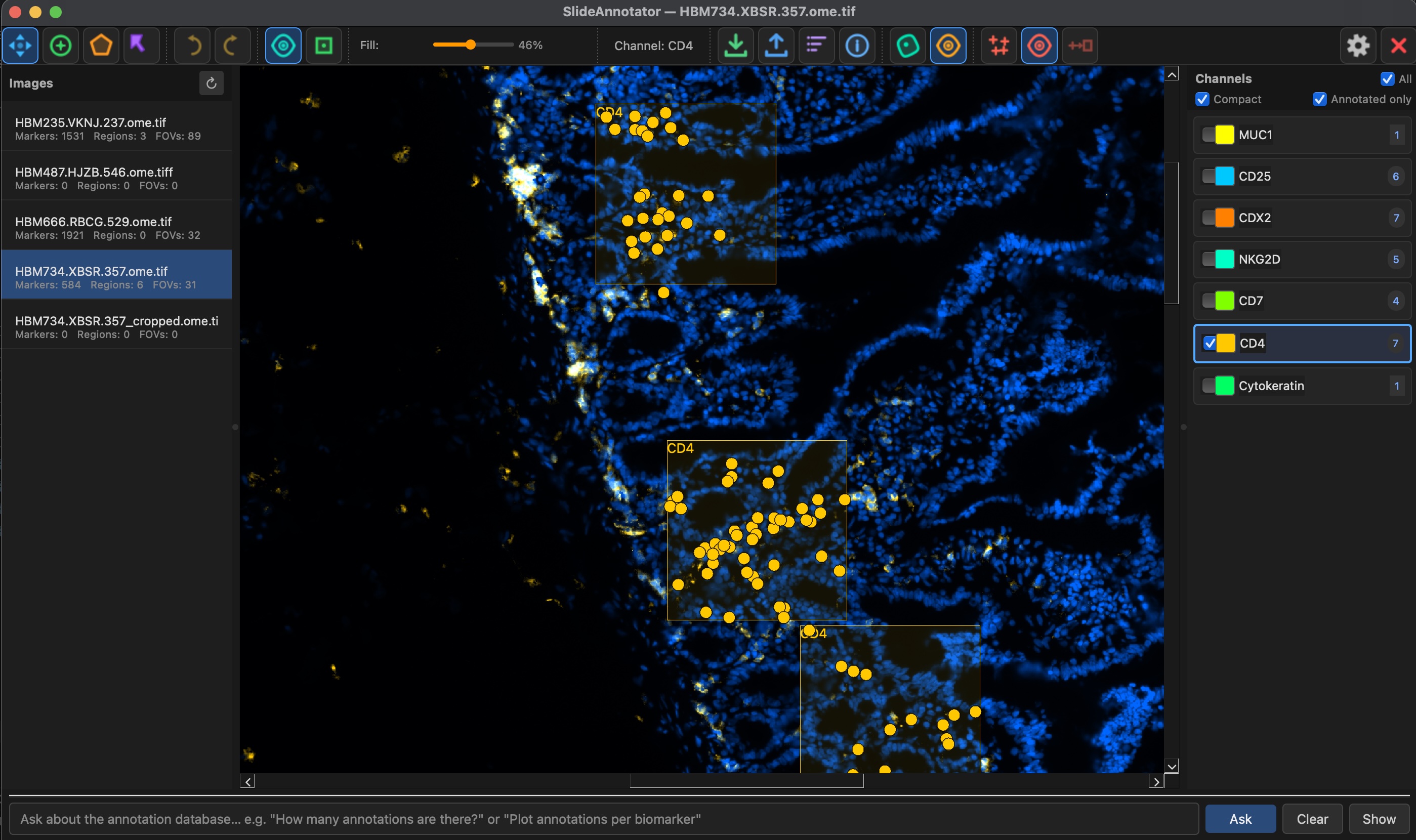
SlideAnnotator is an offline tool that lets anyone navigate and annotate digital pathology slides. By "annotate" I mean placing fields of view, delineating regions, and marking (x, y) positions — typically where a cell is positive for a given biomarker. It sounds simple, but a few choices make it distinctive:
- Pyramidal, tile-cached viewer. A performant viewer is crucial. You don't want to spend the whole morning waiting for an image to load every time you zoom or pan. The magic comes from a tile cache over pyramidal formats, rendered with QGraphicsView from PySide6.
- OME-TIFF reading via pyvips. pyvips is a powerful and efficient library for handling very large images. It's well tested and widely used in the computer vision community.
- SQL database for annotation persistence. Annotations are lightweight — mostly a list of points. The choice here was not to store them as raw text or CSVs, but in a database that can be queried efficiently.
- FOV imaging data. Fields of view (FOVs) are the pixel data where annotations actually live. Slides are so large that annotating all of one is unrealistic. FOVs are also the perfect input for model training, since they're typically square regions of 256×256, 512×512, or larger. Their coordinates live in the database mentioned above, while the associated imaging data is stored separately in its own folder so it can be retrieved quickly.
- AI assistance. The tool can answer questions about the data in the database. It sounds like just a fancy feature, but it turns out to be convenient once you have a lot of annotations and want a quick answer, like: "Show me a plot of the number of annotations for these biomarkers (CD3, CD4, PD-L1) by tissue type; I want to see if they're balanced."
- ONNX Runtime. This is where the loop closes. Annotations are used to train models, and models are used to generate or guide more annotations. Several model types are supported, all of them in ONNX format — a widely used standard that ONNX Runtime executes efficiently.
- License: open source. The tool is free for non-commercial use, and you can look under the hood to see the ins and outs for yourself.
There are many more choices, including the UI design, the helper tools and more. None of these are irreversible, which is why I intend to revisit them in the future. This same decision-making process underpins my computer vision engineering and AI infrastructure and MLOps consulting. But I hope this gives you an idea of how a project like this is put together. If you'd like to use it, contribute, or just leave a comment, I'd be glad to hear from you.
See SlideAnnotator on GitHub →
Facing choices like these on your own project?
If you're weighing architectures, dependencies or infrastructure for a computer vision or AI system, tell me a bit about it — I'll get back to you within 1–2 business days.
Let's talk about your project